---
title: ¿Como desvincular tu línea de WhatsApp y volverla a vincular en Hibot?
description: Aprende cómo desvincular y volver a vincular tu línea de WhatsApp
---
[Ir directamente al contenido](https://help.hibotchat.com/es/desvincular-y-revincular-línea-de-whatsapp#main-content)
- [Español](https://help.hibotchat.com/es/desvincular-y-revincular-l%C3%ADnea-de-whatsapp)
- [Português - Brasil](https://help.hibotchat.com/pt-br/como-desvincular-sua-linha-whatsapp-e-re-ligá-la)
Español
Traducciones de Mostrar submenú de
![LogoHiBoT\_SinFondo\_Negro.png\]](https://help.hibotchat.com/hs-fs/hubfs/LogoHiBoT_SinFondo_Negro.png?height=50&name=LogoHiBoT_SinFondo_Negro.png)
Abrir navegación principal
Cerrar navegación principal
- - [Español](https://help.hibotchat.com/es/desvincular-y-revincular-l%C3%ADnea-de-whatsapp)
- [Português - Brasil](https://help.hibotchat.com/pt-br/como-desvincular-sua-linha-whatsapp-e-re-ligá-la)
Español
Traducciones de Mostrar submenú de
- [Ir a hibotchat.com](https://hibotchat.com/)
[Ir a hibotchat.com](https://hibotchat.com/)
Hola ¿Cómo podemos ayudarte?
- No hay sugerencias porque el campo de búsqueda está vacío.
1. [Centro de ayuda](https://help.hibotchat.com/es?hsLang=es)
2. [Otros](https://help.hibotchat.com/es/otros?hsLang=es)
# ¿Como desvincular tu línea de WhatsApp y volverla a vincular en Hibot?
## Aprende cómo desvincular y volver a vincular tu línea de WhatsApp
### 1. Desvincula tu línea
*(Nota: Si cuentas con varias líneas de WhatsApp, debes hacer este proceso para cada una de ellas).* Paso a paso aquí:
Cierra la sesión en tu computadora o portal:
- Abre WhatsApp Web o WhatsApp escritorio
- Haz clic en el ícono menú (Los tres puntos o la flecha), que se encuentra arriba de la lista de chats. Luego haz clic en **"Cerrar sesión"**.
Cierra la sesión desde tu teléfono:
- Abre WhatsApp en tu teléfono.
- Android: Toca el ícono de más opciones (Tres puntos), luego haz clic en "**Dispositivos vinculados".**
- Iphone: En WhatsApp ve a **"Configuración",** luego toca **"Dispositivos vinculados".**
- Selecciona un dispositivo y toca **"Cerrar sesión".**
### 2. Después de realizar lo anterior, dirígete a Hibot para revincular tu línea
*(Nota: Si cuentas con varias líneas de WhatsApp, debes hacer este proceso para cada una de ellas)*:
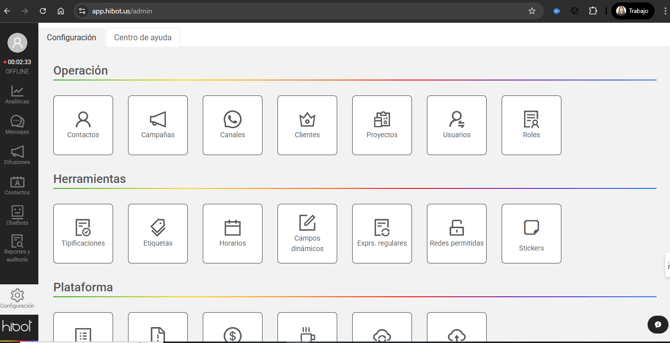
- Dirígete al módulo de **"Canales"** en Hibot. Haciendo clic en el menú lateral izquierdo en la opción "**Configuración**"
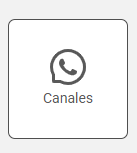
- Selecciona la opción **"Canales"**
****
- Luego, en el filtro de **"Estado"** selecciona **"Desvinculado"** y haz clic en el botón **"Consultar"**.
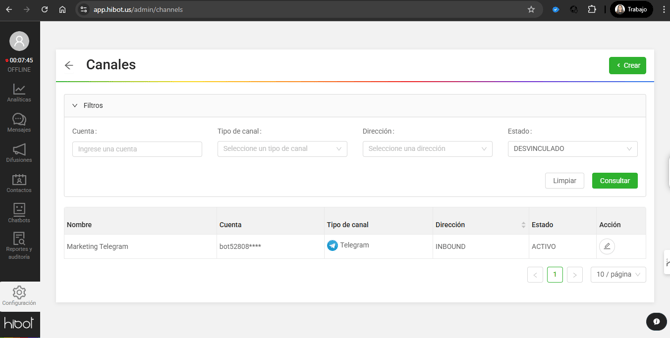
- Allí verás el canal, haz clic en el ícono con forma de reloj ubicado al frente de la información del canal. Al hacer clic allí se generará un código QR.
- Escanea el código y ya tu línea quedará vinculada nuevamente con los cambios aplicados.
- [Inicio](https://help.hibotchat.com/es/inicio?hsLang=es)
- [Analíticas](https://help.hibotchat.com/es/anal%C3%ADticas?hsLang=es#main-content)
- [Métricas Hibot](https://help.hibotchat.com/es/anal%C3%ADticas?hsLang=es#m%C3%A9tricas-hibot)
- [Tablero de control](https://help.hibotchat.com/es/anal%C3%ADticas?hsLang=es#tablero-de-control)
- [Gráficos embudos](https://help.hibotchat.com/es/anal%C3%ADticas?hsLang=es#gr%C3%A1ficos-embudos)
- [Embudos](https://help.hibotchat.com/es/embudos?hsLang=es)
- [Mensajes](https://help.hibotchat.com/es/mensajes?hsLang=es)
- [Difusiones](https://help.hibotchat.com/es/difusiones?hsLang=es)
- [Contactos](https://help.hibotchat.com/es/contactos?hsLang=es)
- [Agente IA](https://help.hibotchat.com/es/agente-ia?hsLang=es)
- [Chatbots](https://help.hibotchat.com/es/chatbots?hsLang=es#main-content)
- [Encuestas](https://help.hibotchat.com/es/chatbots?hsLang=es#encuestas)
- [Reportes y auditoría](https://help.hibotchat.com/es/reportes-y-auditor%C3%ADa?hsLang=es#main-content)
- [Auditoría](https://help.hibotchat.com/es/reportes-y-auditor%C3%ADa?hsLang=es#auditor%C3%ADa)
- [Configuración](https://help.hibotchat.com/es/configuraci%C3%B3n?hsLang=es#main-content)
- [Campañas](https://help.hibotchat.com/es/configuraci%C3%B3n?hsLang=es#campa%C3%B1as)
- [Canales](https://help.hibotchat.com/es/configuraci%C3%B3n?hsLang=es#canales)
- [Clientes](https://help.hibotchat.com/es/configuraci%C3%B3n?hsLang=es#clientes)
- [Proyectos](https://help.hibotchat.com/es/configuraci%C3%B3n?hsLang=es#proyectos)
- [Usuarios](https://help.hibotchat.com/es/configuraci%C3%B3n?hsLang=es#usuarios)
- [Roles](https://help.hibotchat.com/es/configuraci%C3%B3n?hsLang=es#roles)
- [Tipificaciones](https://help.hibotchat.com/es/configuraci%C3%B3n?hsLang=es#tipificaciones)
- [Horarios](https://help.hibotchat.com/es/configuraci%C3%B3n?hsLang=es#horarios)
- [Campos dinámicos](https://help.hibotchat.com/es/configuraci%C3%B3n?hsLang=es#campos-din%C3%A1micos)
- [Exprs. regulares](https://help.hibotchat.com/es/configuraci%C3%B3n?hsLang=es#exprs-regulares)
- [Redes Permitidas](https://help.hibotchat.com/es/configuraci%C3%B3n?hsLang=es#redes-permitidas)
- [Control de licencias](https://help.hibotchat.com/es/configuraci%C3%B3n?hsLang=es#control-de-licencias)
- [Información de la cuenta](https://help.hibotchat.com/es/configuraci%C3%B3n?hsLang=es#informaci%C3%B3n-de-la-cuenta)
- [Facturación](https://help.hibotchat.com/es/configuraci%C3%B3n?hsLang=es#facturaci%C3%B3n)
- [Estados](https://help.hibotchat.com/es/configuraci%C3%B3n?hsLang=es#estados)
- [Otros](https://help.hibotchat.com/es/otros?hsLang=es)
[](http://hibotchat.com)
Centro de ayuda hibotchat.com
Copyright © 2025, Digital Interactions S.A.S