---
title: ¿Cómo responder o reenviar un mensaje específico dentro de una conversación?
description: Todos tus chat en un mismo lugar, no pierdas ni una conversación con tus clientes, aquí cómo responder mensajes en Hibot.
---
[Ir directamente al contenido](https://help.hibotchat.com/es/cómo-responder-mensajes-en-hibot#main-content)
- [Español](https://help.hibotchat.com/es/c%C3%B3mo-responder-mensajes-en-hibot)
- [Português - Brasil](https://help.hibotchat.com/pt-br/cómo-responder-mensajes-en-hibot)
Español
Traducciones de Mostrar submenú de
![LogoHiBoT\_SinFondo\_Negro.png\]](https://help.hibotchat.com/hs-fs/hubfs/LogoHiBoT_SinFondo_Negro.png?height=50&name=LogoHiBoT_SinFondo_Negro.png)
Abrir navegación principal
Cerrar navegación principal
- - [Español](https://help.hibotchat.com/es/c%C3%B3mo-responder-mensajes-en-hibot)
- [Português - Brasil](https://help.hibotchat.com/pt-br/cómo-responder-mensajes-en-hibot)
Español
Traducciones de Mostrar submenú de
- [Ir a hibotchat.com](https://hibotchat.com/)
[Ir a hibotchat.com](https://hibotchat.com/)
Hola ¿Cómo podemos ayudarte?
- No hay sugerencias porque el campo de búsqueda está vacío.
1. [Centro de ayuda](https://help.hibotchat.com/es?hsLang=es)
2. [Mensajes](https://help.hibotchat.com/es/mensajes?hsLang=es)
# ¿Cómo responder o reenviar un mensaje específico dentro de una conversación?
## Todos tus chat en un mismo lugar, no pierdas ni una conversación con tus clientes, aquí cómo responder mensajes en Hibot.
**¡Entre menos clicks mejor!** Hemos venido trabajando en brindarte la posibilidad de que cada día la gestión de tus conversaciones sea más **fluida, enriquecida, rápida y efectiva**. Por eso, ahora puedes responder y reenviar mensajes fácilmente y aquí te enseñaremos a hacerlo.
### Paso a paso cómo responder/reenviar un mensaje en Hibot:
Primero, recuerda que para aprender cómo responder/reenviar mensajes en **Hibot**, debes tener una licencia con **cualquier tipo de rol** dentro de la plataforma.
1. Ingresa a[**Hibot**](https://auth.hibot.us/login?state=hKFo2SBIT2pPZ0dTQzkwM3NSTmY4aWFlTXNYLXB0M0NWZmFMaaFupWxvZ2luo3RpZNkgcVhQSkNoUldvUWhKLVZObmRaR2Z0eThFUDlpYlFsWnSjY2lk2SA5WFRKU2FCTDhpSlRpYnZIUFBYamc1RHBnM0VuVXk2aw&client=9XTJSaBL8iJTibvHPPXjg5Dpg3EnUy6k&protocol=oauth2&response_type=token+id_token&redirect_uri=https%3A%2F%2Fapp.hibot.us%2Fcallback&scope=openid+profile&audience=https%3A%2F%2Fndm.hibot.us%2Fapi&nonce=3nhwFw_bzrYPr23f4EBNGfBfDNSCYYie&auth0Client=eyJuYW1lIjoiYXV0aDAuanMiLCJ2ZXJzaW9uIjoiOS42LjEifQ%3D%3D&utm_source=google&utm_medium=ppc&utm_term=hibot&utm_campaign=HIBOT+MARCA+ESPA%C3%91OL&gclid=EAIaIQobChMI1veKh9qI9AIVht7ICh23iAnxEAAYASAAEgJS-PD_BwE) en tu computador con tu usuario y contraseña.
2. En la parte lateral izquierda de la pantalla verás el panel de control con varias opciones. Haz clic en **"Mensajes"**
3. Se abrirá una pantalla donde verás tus conversaciones. Ahí, haz clic en la conversación en la que deseas responder un mensaje en específico
4. Busca el mensaje específico que deseas responder o reenviar dentro de la conversación.
5. **PARA RESPONDER EL MENSAJE:** En la esquina superior derecha del mensaje, vas a ver un ícono que es un pequeño círculo con una flecha. Vas a hacer clic ahí y luego clic en **“Responder”**.
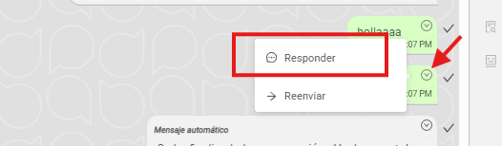
6. La barra de escritura mostrará el mensaje que deseas responder y el campo habilitado para redactar tu respuesta. Tras escribirla, haz clic en el botón **"Enviar"**.
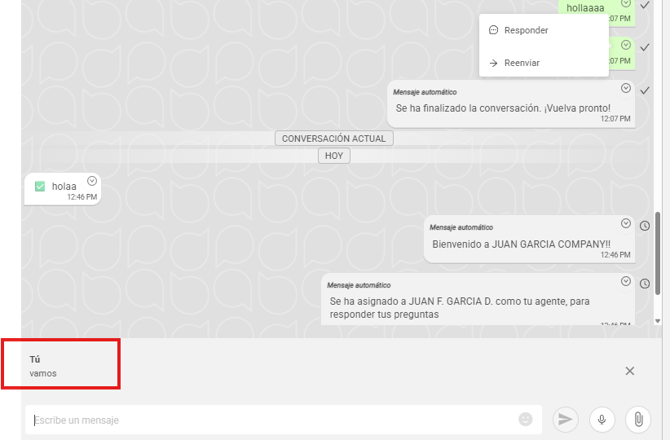
**Nota:** Puedes responder mensajes que haya enviado tu cliente, tu agente o asesor.
7. **PARA REENVIAR EL MENSAJE:** En la esquina superior derecha del mensaje, vas a ver un ícono que es un pequeño círculo con una flecha. Vas a hacer clic ahí y luego clic en **“Reenviar”**.
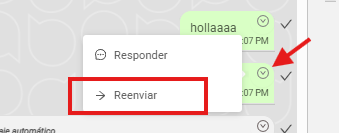
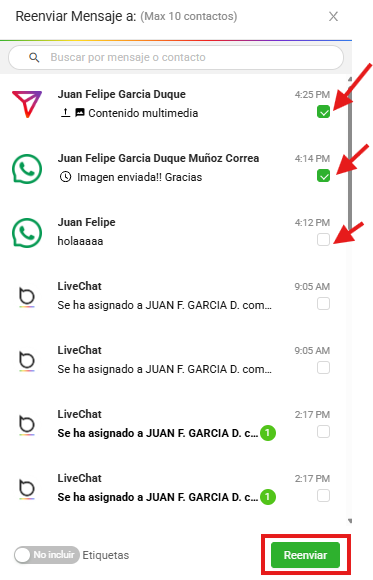
8. Verás que el mensaje que quieres reenviar tendrá un “check” de color verde al lado izquierdo. Tendrás la posibilidad de seleccionar hasta 10 mensajes para reenviar
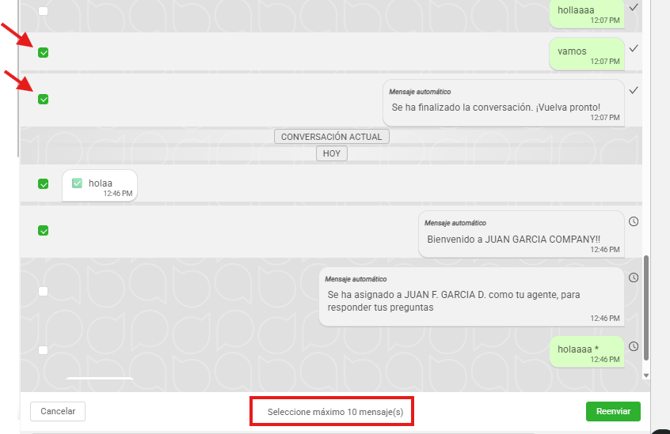
9. En la parte inferior derecha de la conversación encontrarás el botón **“Reenviar”**. Al hacer clic, se abrirá una ventana con tus conversaciones activas para elegir a cuál deseas reenviar el mensaje.
También puedes ubicar la conversación utilizando la barra de búsqueda.
- [Inicio](https://help.hibotchat.com/es/inicio?hsLang=es)
- [Analíticas](https://help.hibotchat.com/es/anal%C3%ADticas?hsLang=es#main-content)
- [Métricas Hibot](https://help.hibotchat.com/es/anal%C3%ADticas?hsLang=es#m%C3%A9tricas-hibot)
- [Tablero de control](https://help.hibotchat.com/es/anal%C3%ADticas?hsLang=es#tablero-de-control)
- [Gráficos embudos](https://help.hibotchat.com/es/anal%C3%ADticas?hsLang=es#gr%C3%A1ficos-embudos)
- [Embudos](https://help.hibotchat.com/es/embudos?hsLang=es)
- [Mensajes](https://help.hibotchat.com/es/mensajes?hsLang=es)
- [Difusiones](https://help.hibotchat.com/es/difusiones?hsLang=es)
- [Contactos](https://help.hibotchat.com/es/contactos?hsLang=es)
- [Agente IA](https://help.hibotchat.com/es/agente-ia?hsLang=es)
- [Chatbots](https://help.hibotchat.com/es/chatbots?hsLang=es#main-content)
- [Encuestas](https://help.hibotchat.com/es/chatbots?hsLang=es#encuestas)
- [Reportes y auditoría](https://help.hibotchat.com/es/reportes-y-auditor%C3%ADa?hsLang=es#main-content)
- [Auditoría](https://help.hibotchat.com/es/reportes-y-auditor%C3%ADa?hsLang=es#auditor%C3%ADa)
- [Configuración](https://help.hibotchat.com/es/configuraci%C3%B3n?hsLang=es#main-content)
- [Campañas](https://help.hibotchat.com/es/configuraci%C3%B3n?hsLang=es#campa%C3%B1as)
- [Canales](https://help.hibotchat.com/es/configuraci%C3%B3n?hsLang=es#canales)
- [Clientes](https://help.hibotchat.com/es/configuraci%C3%B3n?hsLang=es#clientes)
- [Proyectos](https://help.hibotchat.com/es/configuraci%C3%B3n?hsLang=es#proyectos)
- [Usuarios](https://help.hibotchat.com/es/configuraci%C3%B3n?hsLang=es#usuarios)
- [Roles](https://help.hibotchat.com/es/configuraci%C3%B3n?hsLang=es#roles)
- [Tipificaciones](https://help.hibotchat.com/es/configuraci%C3%B3n?hsLang=es#tipificaciones)
- [Horarios](https://help.hibotchat.com/es/configuraci%C3%B3n?hsLang=es#horarios)
- [Campos dinámicos](https://help.hibotchat.com/es/configuraci%C3%B3n?hsLang=es#campos-din%C3%A1micos)
- [Exprs. regulares](https://help.hibotchat.com/es/configuraci%C3%B3n?hsLang=es#exprs-regulares)
- [Redes Permitidas](https://help.hibotchat.com/es/configuraci%C3%B3n?hsLang=es#redes-permitidas)
- [Control de licencias](https://help.hibotchat.com/es/configuraci%C3%B3n?hsLang=es#control-de-licencias)
- [Información de la cuenta](https://help.hibotchat.com/es/configuraci%C3%B3n?hsLang=es#informaci%C3%B3n-de-la-cuenta)
- [Facturación](https://help.hibotchat.com/es/configuraci%C3%B3n?hsLang=es#facturaci%C3%B3n)
- [Estados](https://help.hibotchat.com/es/configuraci%C3%B3n?hsLang=es#estados)
- [Otros](https://help.hibotchat.com/es/otros?hsLang=es)
[](http://hibotchat.com)
Centro de ayuda hibotchat.com
Copyright © 2025, Digital Interactions S.A.S