---
title: ¿Cómo crear tipificaciones en Hibot?
description: Todos tus chat en un mismo lugar, no pierdas ni una conversación con tus clientes, aquí cómo crear tipificaciones en Hibot.
---
[Ir directamente al contenido](https://help.hibotchat.com/es/cómo-crear-tipificaciones-en-hibot#main-content)
- [Español](https://help.hibotchat.com/es/c%C3%B3mo-crear-tipificaciones-en-hibot)
- [Português - Brasil](https://help.hibotchat.com/pt-br/como-criar-tipificações-em-hibot)
Español
Traducciones de Mostrar submenú de
![LogoHiBoT\_SinFondo\_Negro.png\]](https://help.hibotchat.com/hs-fs/hubfs/LogoHiBoT_SinFondo_Negro.png?height=50&name=LogoHiBoT_SinFondo_Negro.png)
Abrir navegación principal
Cerrar navegación principal
- - [Español](https://help.hibotchat.com/es/c%C3%B3mo-crear-tipificaciones-en-hibot)
- [Português - Brasil](https://help.hibotchat.com/pt-br/como-criar-tipificações-em-hibot)
Español
Traducciones de Mostrar submenú de
- [Ir a hibotchat.com](https://hibotchat.com/)
[Ir a hibotchat.com](https://hibotchat.com/)
Hola ¿Cómo podemos ayudarte?
- No hay sugerencias porque el campo de búsqueda está vacío.
1. [Centro de ayuda](https://help.hibotchat.com/es?hsLang=es)
2. [Configuración](https://help.hibotchat.com/es/configuraci%C3%B3n?hsLang=es)
3. [Tipificaciones](https://help.hibotchat.com/es/configuraci%C3%B3n?hsLang=es#tipificaciones)
# ¿Cómo crear tipificaciones en Hibot?
## Todos tus chat en un mismo lugar, no pierdas ni una conversación con tus clientes, aquí cómo crear tipificaciones en Hibot.
> Las tipificaciones son etiquetas personalizadas que puedes aplicar a las conversaciones al finalizarlas 🔖🔖
>
> Esta funcionalidad te permite **clasificar y organizar las interacciones con tus clientes y usuarios** según los criterios que definas. Al categorizar tus conversaciones, obtendrás información valiosa para analizar tendencias, entender las necesidades de tus clientes y mejorar tus procesos.
### **Paso a paso cómo crear tipificaciones en Hibot**
1. En la parte lateral izquierda de la pantalla verás el menú principal con varias opciones.
Haz clic en la opción de **“Configuración ”.
**
2. Dentro del menú de Configuración, selecciona la opción **“Tipificaciones”**.
****
3. Se abrirá una pantalla donde verás en la esquina superior derecha un botón que dice **“Crear”,** haz clic ahí**.
**
4. Se abrirá una ventana emergente con un campo de texto.
Escribe en este campo el **nombre de la tipificación** que deseas crear.
Elige un nombre claro y descriptivo que te permita identificar fácilmente la categoría de la conversación.
De forma opcional se pueden **agregar sub-tipificación** a cada tipificación (Por ejemplo: Tipificación “Ventas”; como sub-tipificación se podría agregar “Ventas online, Ventas al por mayor, Ventas en punto de venta”.
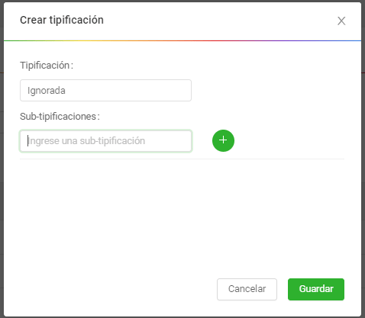
5. Una vez que hayas ingresado el nombre, haz clic en el botón **“Guardar”** para finalizar la creación de la tipificación.

¡Listo! 🎯🎯 Tu nueva tipificación estará disponible para ser utilizada al finalizar las conversaciones.
**Adicional, Para visualizar y gestionar las tipificaciones que ya has creado en Hibot, puedes utilizar las funciones de búsqueda y filtrado.**
Puedes entonces:
- Buscar por nombre: Ingresa el nombre de la tipificación que deseas encontrar en el campo de búsqueda.
- Filtrar por estado: Selecciona el estado de las tipificaciones que quieres ver (por ejemplo, activas o inactivas, si esta funcionalidad está disponible).
- Consultar: Después de aplicar los filtros deseados, haz clic en el botón "Consultar" para ver los resultados.
Con estas herramientas, podrás mantener tus tipificaciones organizadas y encontrar fácilmente las categorías que necesitas para analizar tus conversaciones.
**Puedes también editar las Tipificaciones creadas y allí cambiar su estado de “Activo” a “Inactivo” o viceversa y también agregar sub-tipificaciones.** Para ello, en el mismo módulo busca la tipificación que quieres editar y haz clic en el botón “editar”.
Se abrirá una ventana donde podrás editar la tipificación seleccionada, donde puedes cambiar el estado (activarla para que puedas usarla en tu gestión diaria o desactivarla) de la tipificación y agregar sub-tipificaciones, si así lo requieres. Una vez realizados los cambios selecciona la opción de **“Guardar”**.

🎥 Aprende a usar mejor tus tipificaciones con este video 📊✨
- [Inicio](https://help.hibotchat.com/es/inicio?hsLang=es)
- [Analíticas](https://help.hibotchat.com/es/anal%C3%ADticas?hsLang=es#main-content)
- [Métricas Hibot](https://help.hibotchat.com/es/anal%C3%ADticas?hsLang=es#m%C3%A9tricas-hibot)
- [Tablero de control](https://help.hibotchat.com/es/anal%C3%ADticas?hsLang=es#tablero-de-control)
- [Gráficos embudos](https://help.hibotchat.com/es/anal%C3%ADticas?hsLang=es#gr%C3%A1ficos-embudos)
- [Embudos](https://help.hibotchat.com/es/embudos?hsLang=es)
- [Mensajes](https://help.hibotchat.com/es/mensajes?hsLang=es)
- [Difusiones](https://help.hibotchat.com/es/difusiones?hsLang=es)
- [Contactos](https://help.hibotchat.com/es/contactos?hsLang=es)
- [Agente IA](https://help.hibotchat.com/es/agente-ia?hsLang=es)
- [Chatbots](https://help.hibotchat.com/es/chatbots?hsLang=es#main-content)
- [Encuestas](https://help.hibotchat.com/es/chatbots?hsLang=es#encuestas)
- [Reportes y auditoría](https://help.hibotchat.com/es/reportes-y-auditor%C3%ADa?hsLang=es#main-content)
- [Auditoría](https://help.hibotchat.com/es/reportes-y-auditor%C3%ADa?hsLang=es#auditor%C3%ADa)
- [Configuración](https://help.hibotchat.com/es/configuraci%C3%B3n?hsLang=es#main-content)
- [Campañas](https://help.hibotchat.com/es/configuraci%C3%B3n?hsLang=es#campa%C3%B1as)
- [Canales](https://help.hibotchat.com/es/configuraci%C3%B3n?hsLang=es#canales)
- [Clientes](https://help.hibotchat.com/es/configuraci%C3%B3n?hsLang=es#clientes)
- [Proyectos](https://help.hibotchat.com/es/configuraci%C3%B3n?hsLang=es#proyectos)
- [Usuarios](https://help.hibotchat.com/es/configuraci%C3%B3n?hsLang=es#usuarios)
- [Roles](https://help.hibotchat.com/es/configuraci%C3%B3n?hsLang=es#roles)
- [Tipificaciones](https://help.hibotchat.com/es/configuraci%C3%B3n?hsLang=es#tipificaciones)
- [Horarios](https://help.hibotchat.com/es/configuraci%C3%B3n?hsLang=es#horarios)
- [Campos dinámicos](https://help.hibotchat.com/es/configuraci%C3%B3n?hsLang=es#campos-din%C3%A1micos)
- [Exprs. regulares](https://help.hibotchat.com/es/configuraci%C3%B3n?hsLang=es#exprs-regulares)
- [Redes Permitidas](https://help.hibotchat.com/es/configuraci%C3%B3n?hsLang=es#redes-permitidas)
- [Control de licencias](https://help.hibotchat.com/es/configuraci%C3%B3n?hsLang=es#control-de-licencias)
- [Información de la cuenta](https://help.hibotchat.com/es/configuraci%C3%B3n?hsLang=es#informaci%C3%B3n-de-la-cuenta)
- [Facturación](https://help.hibotchat.com/es/configuraci%C3%B3n?hsLang=es#facturaci%C3%B3n)
- [Estados](https://help.hibotchat.com/es/configuraci%C3%B3n?hsLang=es#estados)
- [Otros](https://help.hibotchat.com/es/otros?hsLang=es)
[](http://hibotchat.com)
Centro de ayuda hibotchat.com
Copyright © 2025, Digital Interactions S.A.S